
 Sign in
 Sign up


Flight Control System (FCS) – Drone Systems Explained 1
Flight Control System (FCS)
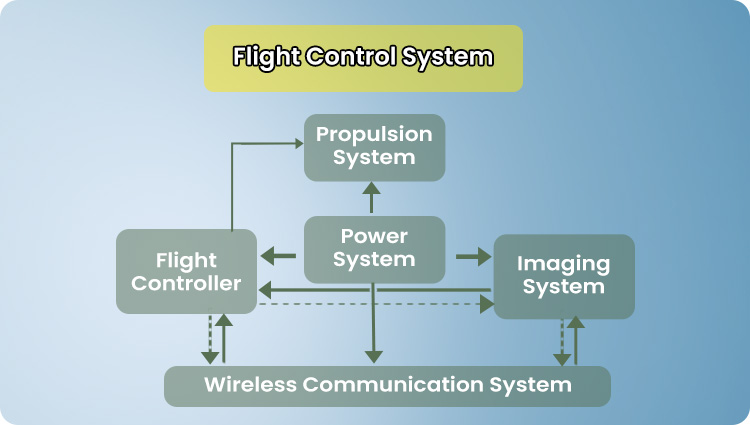
The drone’s Flight Control System (FCS) is a complete control system made up of sensors, algorithms, and control logic that work together to keep the drone stable, controllable, and safe. It processes data related to motion, orientation, magnetic direction, altitude, ground texture, and GNSS position, and uses this information to determine how the drone should behave in real time.
In short: The Flight Control System defines how the drone thinks and flies, while the Flight Control Board is the physical platform that makes those calculations possible.
Flight Control Board
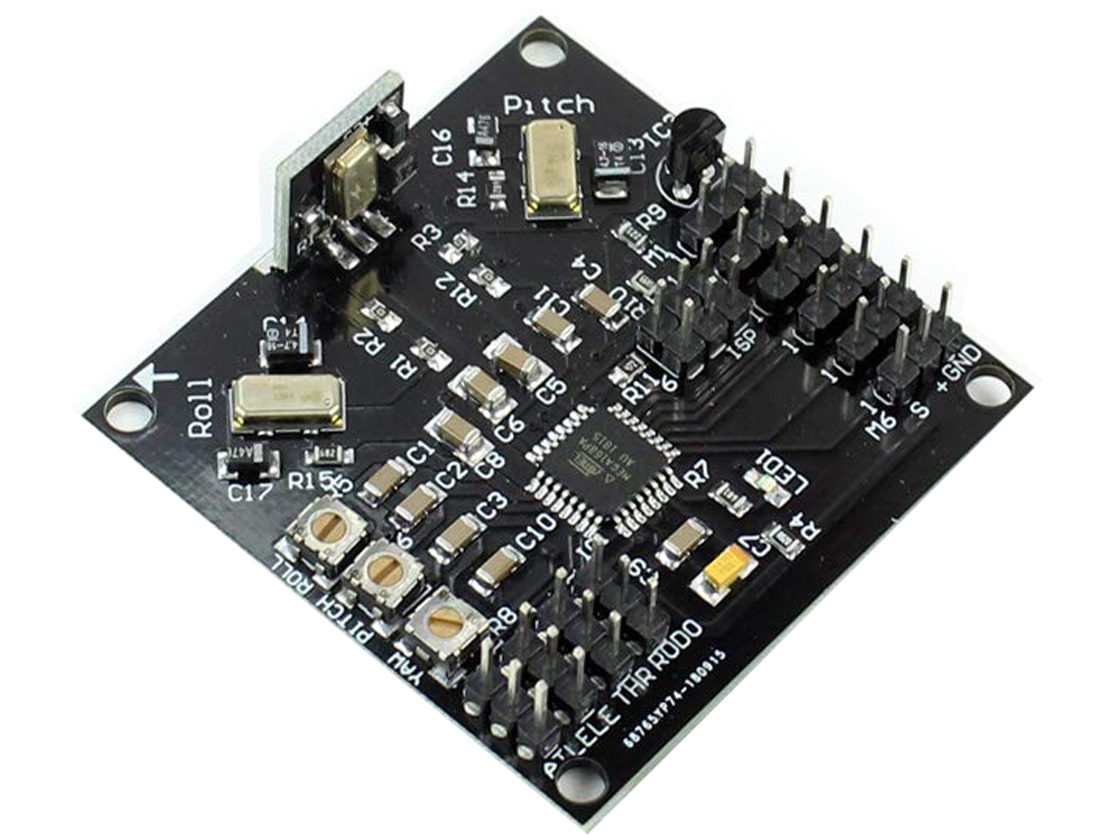
The Flight Control Board is the physical hardware that carries and runs the Flight Control System. All critical sensors are mounted on or connected to this board, and its onboard processor executes the FCS algorithms and outputs precise control signals to the motors and electronic speed controllers (ESCs).
Attitude & Motion
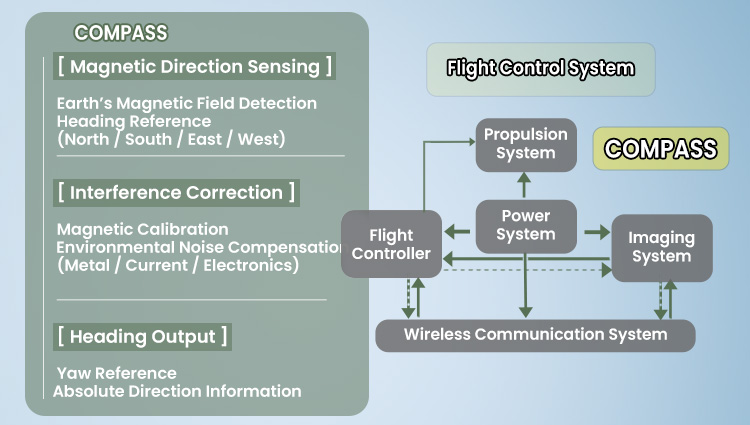
Heading Direction
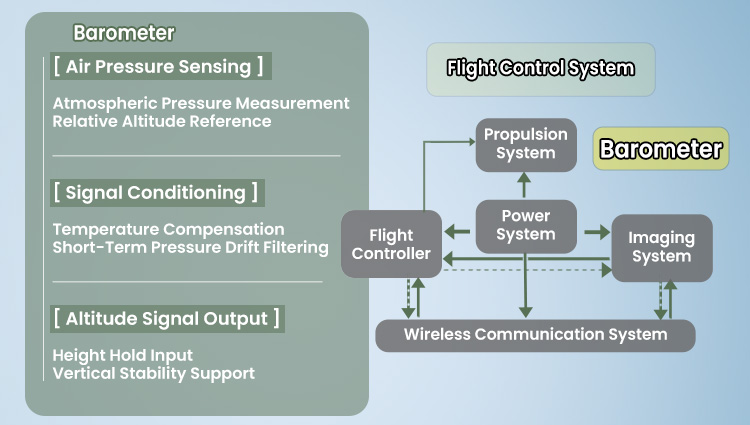
Altitude Hold
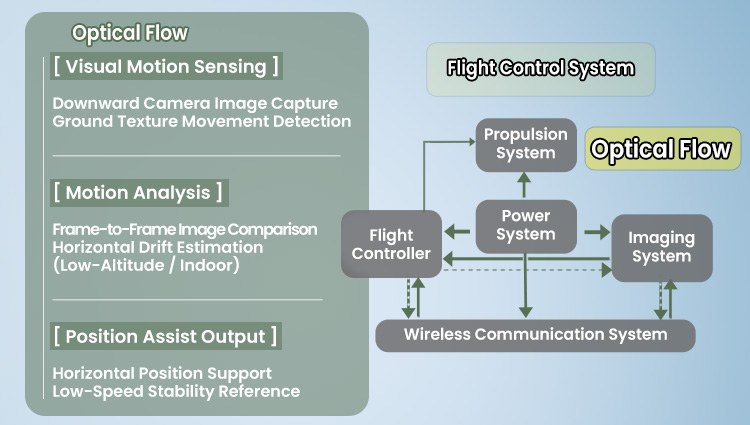
Near-ground stability
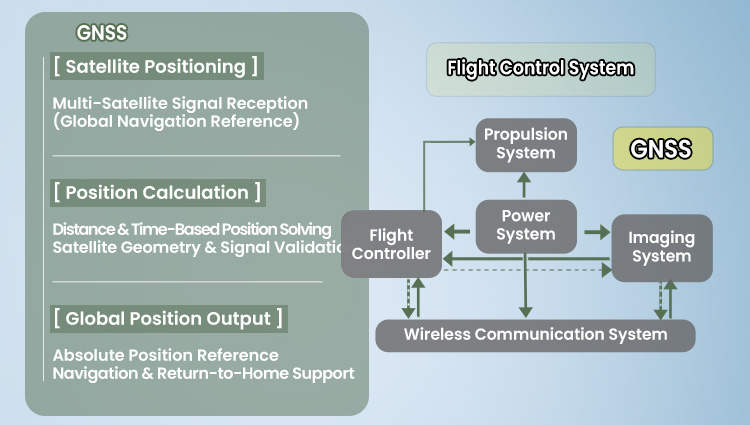
Outdoor positioning
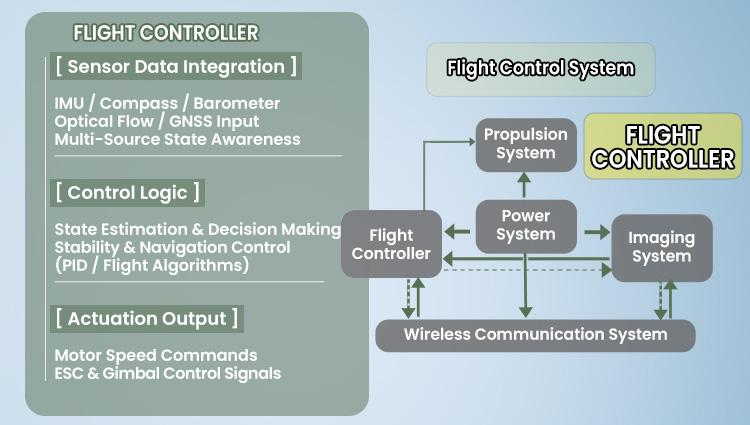
Fusion & decisions
Part 1IMU – Motion & Attitude Sensing ↑ Back
What – What does the IMU do?
IMU = The drone’s sense of balance and movement
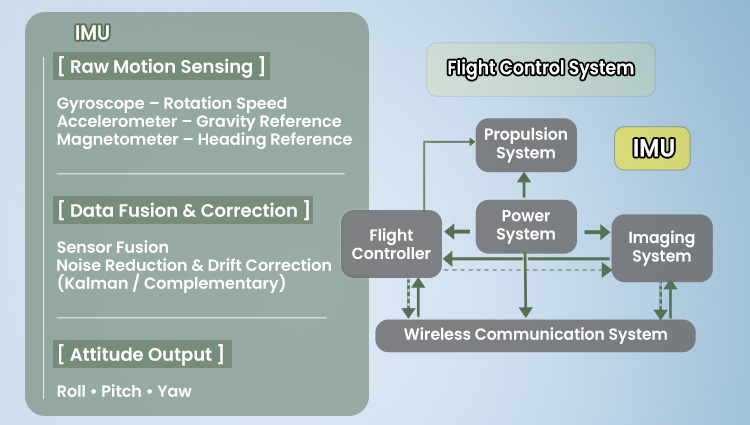
The IMU (Inertial Measurement Unit) is the sensor system that allows a drone to feel how it is moving.It constantly detects rotation, tilt, and direction changes, helping the drone understand its own motion in the air.
Why – Why is the IMU essential for stable flight?
Without an IMU, a drone would have no idea whether it is level, tilting, or spinning. The IMU provides the flight controller with continuous motion and orientation awareness, allowing the drone to stay balanced and respond instantly to movement.
Gyroscope – detects how fast and in which direction the drone is rotating.
Accelerometer – senses gravity and acceleration to determine tilt and level.
Magnetometer – detects the Earth’s magnetic field to identify heading direction.
Together, these sensors allow the drone to understand how it is moving and how it is oriented, even during fast maneuvers or sudden changes in direction.
How – How does the IMU work in real flight?
As the drone moves, the IMU continuously collects raw motion data from its sensors. This data is then cleaned, corrected, and combined using sensor fusion algorithms, reducing noise and correcting drift over time.
Instead of sending raw sensor signals, the IMU outputs clear attitude information — how much the drone is tilted left or right, pitched forward or backward, and which direction the nose is pointing.
This information is sent to the flight controller hundreds of times per second, allowing the drone to remain stable, smooth, and predictable in the air.
Extra – What is gyroscope calibration, and when is it needed?
Gyroscope calibration teaches the IMU what “perfectly still and level” means. During calibration, the drone records a reference state so it can accurately detect rotation and movement during flight.
Calibration is recommended if the drone drifts slightly on takeoff, appears tilted while hovering, or after transportation, firmware updates, or minor impacts.
Place the drone on a flat, stable surface before calibration. Keep it completely still during the process.
Do Not:
Do not calibrate while holding the drone, on uneven surfaces, or immediately after flight when the drone is still warm.
Risk:
Incorrect calibration may cause drifting, unstable hovering, or inaccurate motion detection during flight.
Part 2Compass – Heading Direction ↑ Back
What – What is the Compass?
Compass = The drone’s sense of direction
The compass helps the drone understand which way it is facing. It works like a built-in electronic compass: it detects the Earth’s magnetic field and tells the drone its heading direction (north, south, east, west).
Inside the drone, this function is handled by a tiny sensor called a magnetometer.
Why – Why does the Compass matter for flight direction?
The IMU helps the drone stay balanced, but it cannot tell absolute direction. The compass provides a fixed “which way am I facing?” reference, so the drone can turn correctly, fly straight, and navigate safely.
It helps the drone fly in the intended direction when you push the sticks.
It supports accurate navigation features such as Return-to-Home.
It reduces the chance of unwanted rotation, drifting, or “getting lost” when orientation is unclear.
If compass readings are wrong, the drone may rotate by itself, drift sideways, or even try to return in the wrong direction.
How – How does the Compass work?
The magnetometer measures the surrounding magnetic field and compares it to the Earth’s natural magnetic pattern. This allows the drone to estimate its heading direction.
However, magnetic readings can be easily affected by metal objects, electrical currents, and electronics. That’s why compass calibration is important: it helps the drone separate the Earth’s magnetic field from local interference in the current environment.
If the compass is not calibrated correctly (or the environment is magnetically “dirty”), the drone may hover with a strange circular drift — a phenomenon often called the “Toilet Bowl Effect”.
Extra – Compass calibration and the Toilet Bowl Effect (TBE)
Compass calibration teaches the drone what a “normal” magnetic field looks like in the current location. Because magnetic conditions can change from place to place, good calibration helps the drone maintain accurate heading.
Safety tip – Where to calibrate the compass
Calibrate the compass in a wide open outdoor area with minimal surrounding metal and electronic equipment. Choose a location with natural ground and clear space, where all potential magnetic and electromagnetic interference sources are far away.
Do Not:
Do not calibrate the compass indoors, on metal floors, on steel rooftops, next to vehicles, or near high-voltage power lines, mobile base stations, radar stations, broadcasting towers, or dense steel-reinforced buildings.
Risk:
Improper compass calibration may seriously distort heading data and trigger the Toilet Bowl Effect, leading to unstable hovering, circular drifting, and abnormal flight paths.
When should you calibrate the Compass?
When the drone is new or has just been repaired.
When flying in a new location far from the last takeoff point.
When the app shows a compass error or abnormal heading warning.
After a crash or strong impact.
How to calibrate the compass?
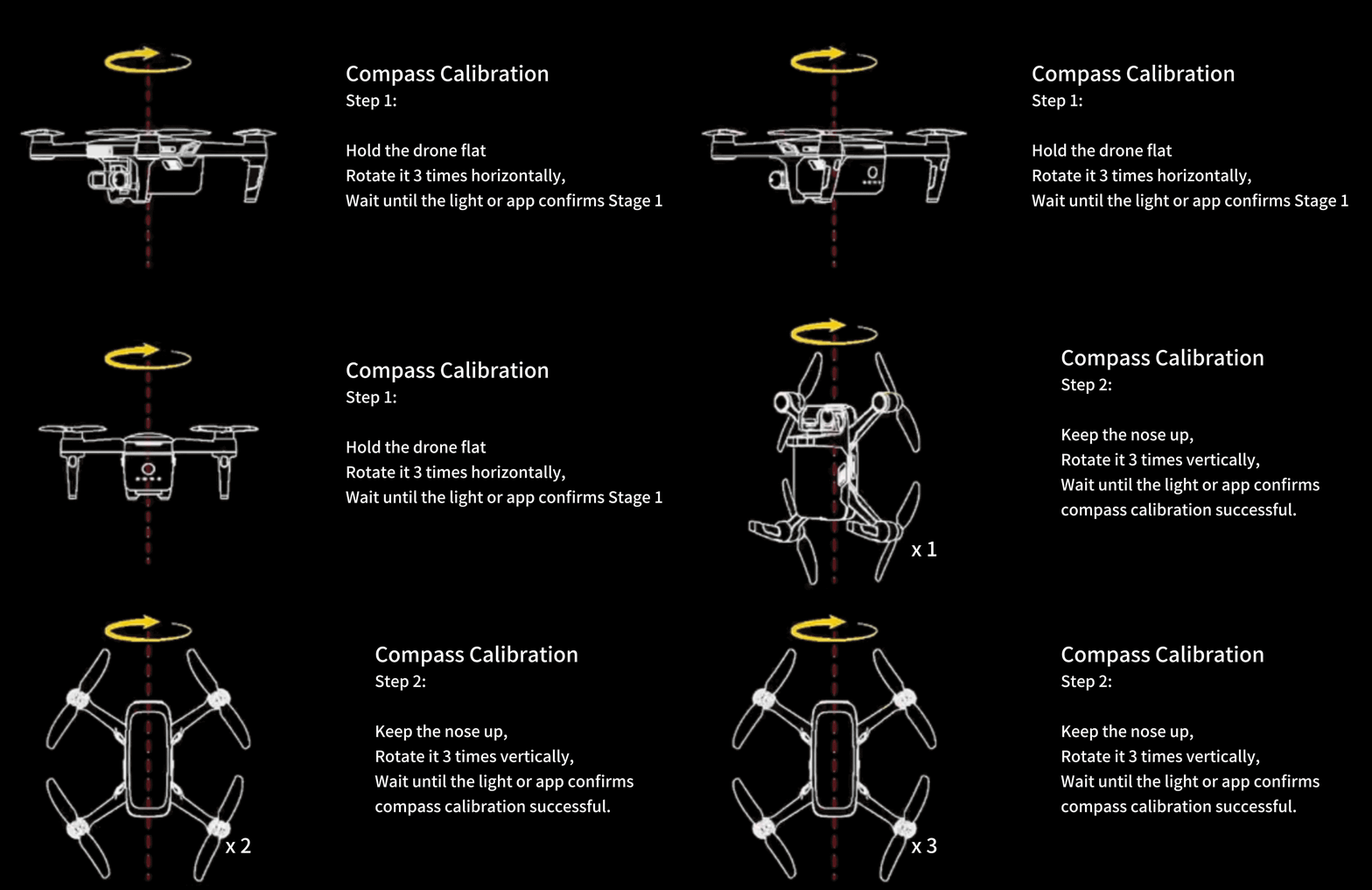
What happens if the Compass is not calibrated correctly?
If calibration is skipped or done in a magnetically polluted area, the flight controller may receive incorrect heading data. This can lead to side drifting, unexpected rotation, inaccurate Return-to-Home direction, or a typical hovering instability called the “Toilet Bowl Effect” (TBE).
What is the Toilet Bowl Effect (TBE)?
The Toilet Bowl Effect describes a situation where a drone, instead of hovering steadily, starts to fly in widening circles around a point — similar to water swirling in a toilet bowl.
Typical flight behavior
The drone slowly rotates by itself.
At the same time, it drifts sideways.
The circular path becomes larger and larger.
What is happening inside the flight controller?
From a flight control perspective, the Toilet Bowl Effect appears when the three core direction systems do not agree with each other:
Compass heading ≠ GNSS motion direction ≠ IMU attitude calculation
The flight controller keeps correcting a drift that does not truly exist. Each wrong correction creates a new error, causing the spiral movement to grow larger and larger over time.
What causes the Toilet Bowl Effect?
Incorrect compass calibration near steel structures, cars, manhole covers, or strong magnetic sources.
Powering on indoors without GPS and then switching to GPS mode outdoors in mid-air.
Magnetic interference from motor current, wiring, or a battery placed too close to the magnetometer.
Physical damage or aging of the compass hardware after crashes or water exposure.
What should pilots do?
If early signs of the Toilet Bowl Effect appear, pilots should:
Land immediately.
Recalibrate the compass in a clean, open outdoor environment.
Check for magnetic interference before continuing the flight.
Part 3Barometer – Altitude Hold ↑ Back
What – What does the Barometer do?
Barometer = The drone’s sense of height
The barometer helps the drone understand how high it is flying. It works by detecting changes in air pressure and converting them into altitude information.
As air pressure decreases with height, even small pressure changes can tell the drone whether it is rising, descending, or holding a steady altitude.
Why – Why is the Barometer important for stable altitude?
The barometer allows the drone to maintain a stable height instead of drifting upward or sinking unexpectedly. This is especially important for smooth hovering, indoor flight, and beginner-friendly control.
It prevents sudden upward jumps during takeoff.
It reduces unwanted drops while hovering.
It makes landing more controlled and predictable.
Without reliable barometer data, the drone would struggle to keep a steady height, making flight feel unstable and harder to control.
How – How does the Barometer work during flight?
When the drone takes off, the barometer first records the air pressure near the ground as a reference point. As the drone climbs higher, the surrounding air pressure becomes lower.
By continuously comparing current pressure readings to this reference, the flight controller can determine whether the drone is rising, descending, or staying at the selected altitude.
If the drone starts to drift up or down unintentionally, the flight controller immediately adjusts motor power to bring it back to the desired height. This constant feedback loop is what creates stable altitude hold.
Extra – When can the Barometer become inaccurate?
Although the barometer is very sensitive, certain environments can disturb air pressure readings and reduce altitude accuracy.
Strong airflow from air conditioners or fans.
Sudden pressure changes caused by opening or closing doors in small rooms.
Very fast climbs or drops, where pressure response may briefly lag behind.
Rapid temperature changes that affect air density.
Safety tip – Barometer disturbance from strong airflow
In these situations, the drone may show small up-and-down movements, unstable hovering, or inaccurate height readings during automatic landing.
Part 4Optical Flow – Near-ground Stability ↑ Back
What – What is Optical Flow?
Optical Flow = The drone’s “ground watching” helper
Optical Flow is a visual positioning system that helps a drone stay steady near the ground. It uses a small downward-facing camera to “watch” the surface below and check whether the drone is sliding left, right, forward, or backward.
In simple terms: the drone compares one frame to the next and looks for how the ground pattern shifts. That shift tells the drone if it is drifting.
The Optical Flow sensor is usually a separate hardware module installed on the bottom of the drone. Even though it belongs to the Flight Control System, it is often not on the main flight control board — it connects through signal wiring as its own unit.
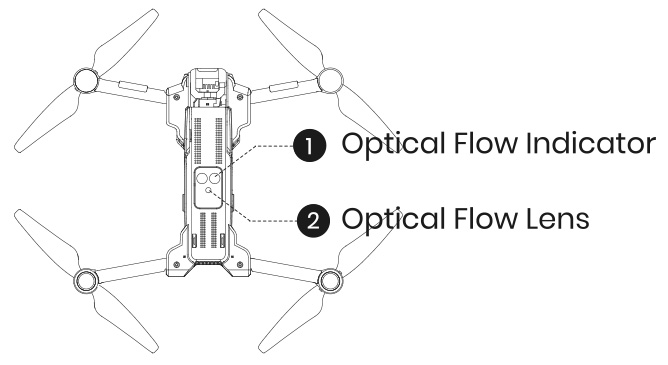
Why – Why is Optical Flow important for low-altitude stability?
GPS is great outdoors, but near the ground (and especially indoors) GPS can be weak or unavailable. Optical Flow helps fill that gap by providing a “near-ground lock” so the drone doesn’t slowly slide away.
It reduces slow horizontal drifting while hovering close to the ground.
It improves stability for indoor flight and low-altitude outdoor flight.
It helps beginners hover more easily with less stick correction.
Without Optical Flow, a drone near the ground is more likely to “slide” across the floor or drift unpredictably due to small air movements, delayed control inputs, or weak GPS positioning.
How – How does Optical Flow work?
The downward camera continuously captures images of the surface beneath the drone. The system compares how ground features move from one frame to the next to estimate horizontal motion.
If the drone begins to drift, Optical Flow sends that drift information to the flight controller. The flight controller then slightly adjusts motor output in the opposite direction to “push back” and keep the drone hovering in place.
Optical Flow is most effective at low altitude and in environments where the camera can clearly see texture. A common working range is about 1.6–9.8 ft. In darker rooms, turning on the drone lights can help the camera recognize the ground pattern more reliably.
Safety tip – When Optical Flow may not work
Avoid flying over featureless, monochrome, repetitive, highly reflective, transparent, water, or moving surfaces. Avoid extremely dark, overly bright, or rapidly changing lighting. Do not fly at excessive low-altitude speed.
Maintenance:
Keep the Optical Flow sensor clean at all times. Do not scratch or tamper with it. Avoid dusty and humid environments.
Fail-Safe Behavior:
If Optical Flow visual data becomes unavailable, the drone will revert to basic altitude-hold mode only. Always fly with extra caution when operating close to the ground.
Part 5GNSS – Outdoor Positioning ↑ Back
What – What is GNSS?
GNSS = The drone’s outdoor location system
GNSS (Global Navigation Satellite System) is the system that allows a drone to know where it is on Earth when flying outdoors. It works by receiving timing signals from multiple satellites in space.
By comparing how long each satellite signal takes to arrive, the drone can calculate:
Its geographic position.
Its movement direction and ground speed.
Whether it can safely navigate back to the Home Point.
In simple terms, GNSS is what lets the drone answer the question: “Where am I, and where is home?”
Safety tip – GNSS lock before takeoff
Taking off without a solid GNSS lock may cause drifting, inaccurate Return-to-Home, or unstable positioning.
Safety tip – Environments where GNSS is unreliable
Do not rely on GNSS positioning in these environments.
Common GNSS satellite systems used by drones
| System | Country / Region | Description |
|---|---|---|
| GPS | United States | Most widely used global system |
| GLONASS | Russia | Improves positioning stability |
| Galileo | European Union | Very high positioning accuracy |
| BeiDou | China | Strong global and regional coverage |
| QZSS | Japan | Regional signal enhancement system |
Multi-GNSS positioning
Many modern drones use multi-GNSS positioning, meaning several satellite systems work together at the same time (for example: GPS + Galileo + BeiDou).
Faster satellite lock.
More stable positioning.
Better resistance to signal blockage.
More reliable Return-to-Home accuracy.
Why – Why is GNSS essential for outdoor safety and navigation?
GNSS is the foundation of safe outdoor flight. It allows the drone to hold its position against wind and fly based on real-world location.
Enables accurate outdoor hovering.
Supports reliable Return-to-Home when signal is lost or the pilot presses the button.
Makes waypoint flight and intelligent flight modes possible.
Without GNSS, a drone flying outdoors would slowly drift with the wind and could not safely find its way back to the takeoff point.
How – How does GNSS work?
The GNSS receiver listens to timing signals from multiple satellites in the sky. By measuring the signal delay from each satellite, the drone calculates its position using triangulation.
The flight controller then combines GNSS position data with information from the IMU and compass. This fusion allows the drone to stay locked to a point, follow a path, or return home accurately.
For GNSS to work well, the drone needs a clear view of the sky, enough visible satellites, and a stable satellite lock before takeoff.
Extra – When can GNSS become unreliable or fail?
Safety tip – What affects GNSS accuracy
Fly in wide, open outdoor areas with a clear sky view. Wait until the app shows “GPS Ready” / “GPS Locked” before takeoff.
Do Not:
Do not take off indoors, under roofs, inside tree canopies, or between tall buildings. Avoid reflective surfaces and electromagnetic interference sources.
Risk:
Poor GNSS conditions may cause drifting, inaccurate Home Point, unstable hovering, circular drifting (Toilet Bowl Effect), or incorrect Return-to-Home behavior.
When GNSS conditions are unstable, pilots should fly cautiously, keep the drone close, or wait until satellite reception improves.
Part 6Flight Controller – Fusion & Decision ↑ Back
What – What is the Flight Controller?
Flight Controller = The drone’s decision-making brain
The flight controller is the central computer inside the drone. It does not sense the world directly — instead, it listens to all the sensors, reads the pilot’s commands, and decides how the drone should move.
Every moment in flight, the flight controller determines how fast each motor should spin so the drone can stay stable, respond smoothly, and fly safely.
Why – Why is the Flight Controller so important?
Without the flight controller, all sensors and motors would work independently and the drone would be impossible to control. The flight controller is what turns separate parts into a coordinated flying system.
It combines information from the IMU, Compass, Barometer, Optical Flow, and GNSS into one clear understanding of the drone’s state.
It converts pilot stick movements and app commands into smooth, controlled motion instead of sudden or unstable reactions.
It manages safety behaviors such as Return-to-Home, low-battery protection, and loss-of-signal failsafes.
In simple terms, the flight controller is why modern drones feel predictable, stable, and beginner-friendly — even in changing wind or complex environments.
How – How does the Flight Controller work?
The flight controller runs a fast decision loop many times per second. Each loop follows the same simple logic:
1. Read – Gather fresh sensor data and the pilot’s latest commands.
2. Decide – Calculate how much the drone should tilt, climb, turn, or slow down to stay stable and follow the intended path.
3. Act – Send precise speed adjustments to each motor to make those corrections happen.
Because this loop runs hundreds of times per second, the flight controller can react to wind gusts, sudden stick inputs, or small disturbances faster than a human pilot can notice.
Extra – How can pilots help the Flight Controller?
Even the smartest flight controller relies on good input. Simple pilot habits can greatly improve flight stability and safety.
Check basics before flight: propellers secure, battery locked, and sensors or camera lenses clean.
Complete required calibrations (IMU, compass, etc.) in a suitable environment when prompted by the app.
Wait for a stable GNSS lock with enough satellites before outdoor takeoff.
Avoid environments with strong magnetic or radio interference that can confuse sensor data.
When these conditions are met, the flight controller can fully use all six core systems to deliver smooth, stable, and confident flight.
 – Drone Systems Explained 1&src=http%3A%2F%2Fwww.holystone.com%2FPublic%2FHome%2Fimages%2Fshare_logo.png)

COMMENTS